Can I check in/out drawings from HyDraw CAD into Autodesk Vault?
There is no direct option to check in/out files into Vault through HyDraw CAD due to Autodesk limitation on use of Vault with AutoCAD OEM (on which HyDraw CAD is built).
But, it is found that with Vault Workgroup 2016 using the Vault Explorer, the DWG files could Open, View, Check In and Check Out with HyDraw CAD.
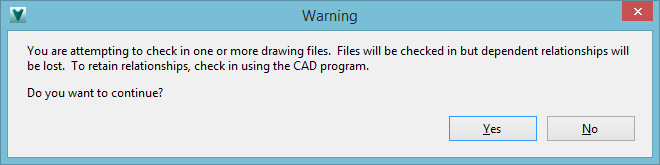
While Check In, you will get the following message, though the Check In will be successful.
Related Articles
HyDraw CAD and Autodesk Vault Compatibility Matrix
This table outlines the compatibility between different versions of HyDraw CAD and Autodesk Vault, including both Vault Client and Vault Server versions. It helps users ensure seamless integration and data management when using HyDraw CAD with ...
Is HyDraw CAD 2024 compatible with Autodesk Vault 2024?
The Vault add-in for HyDraw CAD 2024 was developed to be compatible with Autodesk Vault 2023. However, HyDraw CAD 2024 can work with Autdoesk Vault Server 2024 if Autdoesk Vault Client 2023 is also installed on the same system as HyDraw. To use ...
Opening file from Vault change settings to use default app instead of AutoCAD
When trying to open a file directly from Vault and to ensure the file opens with HyDraw CAD instead of AutoCAD change the settings below. Open the Vault and go to Tools > Options. Open File Behavior Settings. For AutoCAD, set the behavior to Default. ...
Error: "This version of trusted storage is not supported..." appears when trying to activate HyDraw CAD license
When I try to activate HyDraw CAD license, the below error message appears: To resolve the issue, follow the steps below: Close HyDraw CAD completely. Goto: C:\Users\Public\Documents\VEST\Embedded\HyDrawCAD\ Find the folder named NC and delete it. ...
Resolving HyDraw CAD Issues Due to Corrupted User.config Files
Overview: HyDraw CAD is built on AutoCAD OEM, which stores various pane and palette settings, such as position, docking state, size, and loading behavior, in the user.config file. This file is located within the DefaultDomain_Path_* folder at: ...